AI YouTube thumbnail generator: five image models, priced per output.
By the Vwrap team · Updated September 8, 2026
Vwrap generates YouTube thumbnails from four visual slots and a prompt: your own photo, a reference thumbnail, a template, and up to three props. You choose one of five image models and how many outputs a run returns, from 1 to 4. Credits are charged per output, so four outputs on a 50-credit model costs 200 credits, not 50. Every result comes back cropped to 16:9 with its headline as an editable text layer.
How a generation run works
Fill the slots you have
The create page opens on four input slots: Selfie, Reference, Template and Props. None of them is required, and each does a different job: the reference sets the look, the template sets the structure, your own photo sets who is in the frame, and props are objects you want to appear. Attaching a reference is the one worth doing. All five models receive it as an image and follow its layout, composition and visual style, which makes the result more predictable than a prompt on its own. Its text treatment and finer detail carry across as well, so pick one you are happy to inherit from. A second selfie slot unfolds once the first one holds an image.
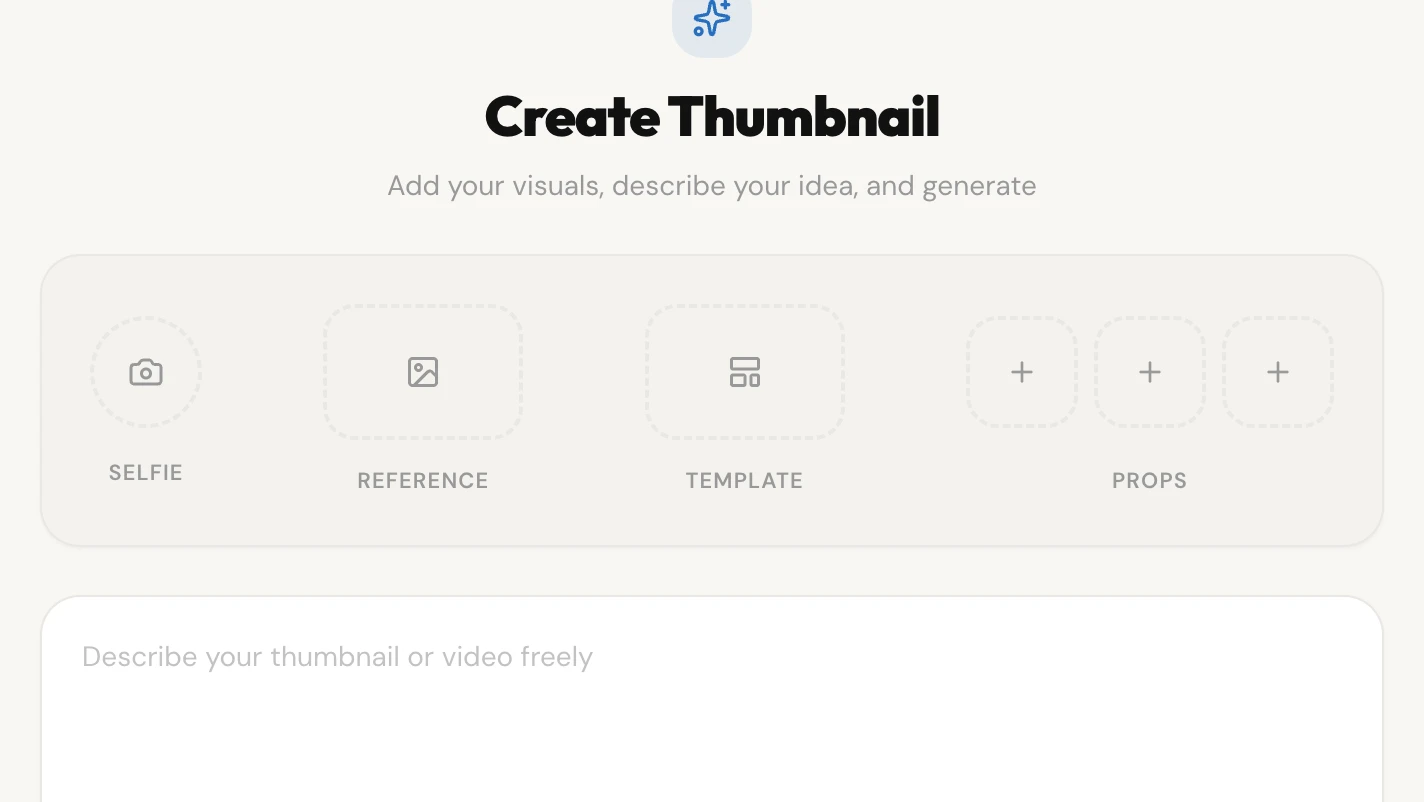
The four slots, empty. Reference and Template each hold one image; Props holds up to three. The prompt box sits below them. Describe the shot
The prompt box takes 3 to 1,000 characters and its contents reach the image model tagged as taking priority over everything else in the instruction. One thing outranks it, and that is the rule against drawing text. Naming a specific product, place or object is useful and carries through word for word; naming a real person does not work, and that person is swapped for a generic figure before the scene reaches the image model.
Pick a model and an output count
The toolbar under the prompt holds the model dropdown, which prints each model's price against its name, marks the ones that need a higher plan, and greys out any you cannot pick. Beside it, a layers button sets how many outputs the run returns and a type button switches the text layer on or off. Leave the text layer on and the headline is set in a real font over the finished image in a separate pass, rather than painted into the scene by the image model. The lettering comes out crisp and spelled as written, and it arrives in the editor as a text object you can retype, restyle or move. The Generate button reads back the count, so it says Generate (4) before a four-output run.
Read the result set
Results open with the selected variant large, the others as a filmstrip beneath it, and a list of suggested titles for the video. Asking for more titles costs 2 credits. From here a variant goes through to the layer editor, where the headline is still a text object rather than pixels.
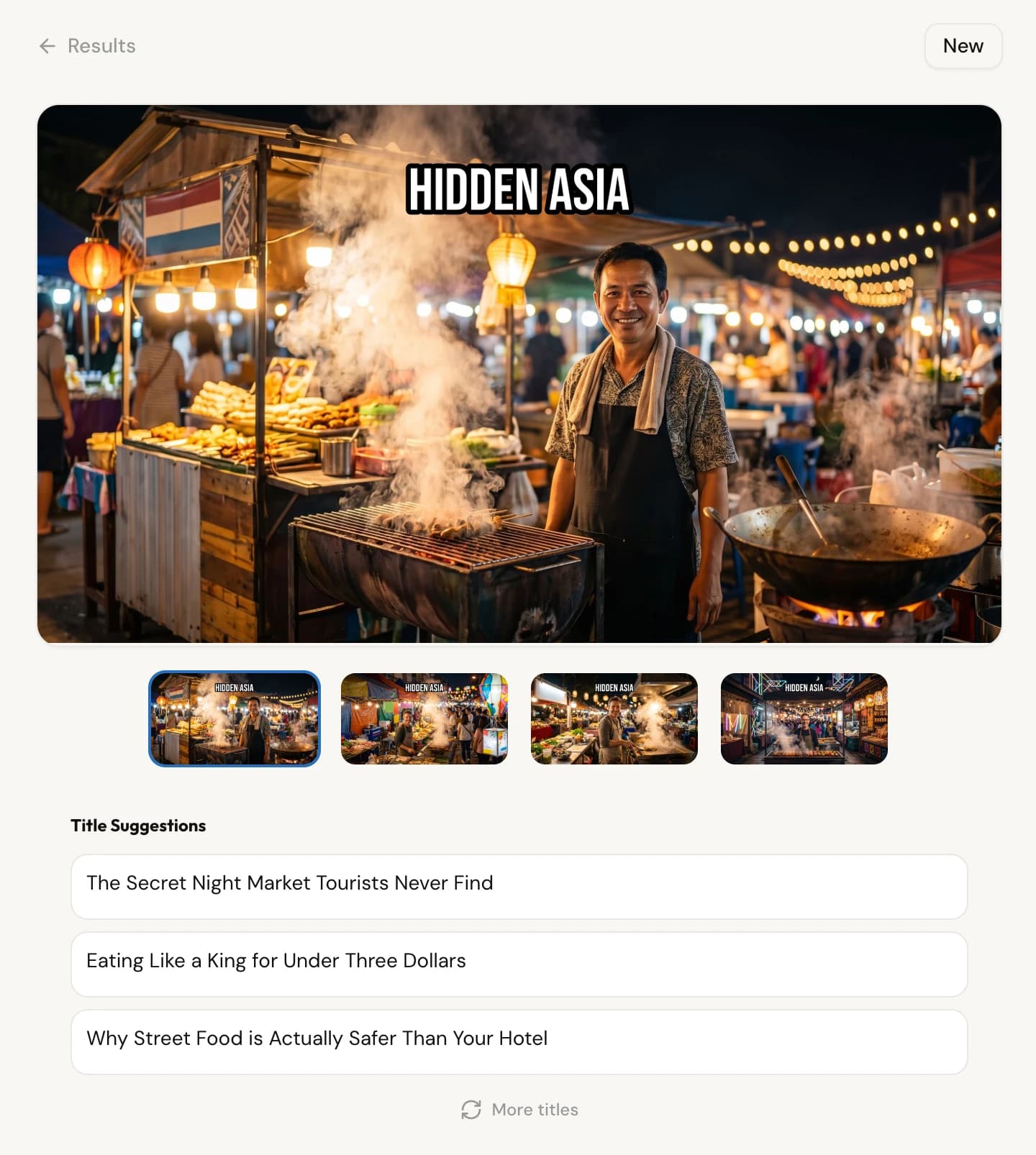
One run, four variants. The HIDDEN ASIA headline did not come from the prompt. It was carried across from the reference thumbnail, which read HIDDEN EUROPE. So did the Dutch flag at the top left.
What each input actually controls
A reference image is the strongest signal on the page. All five selectable models receive it as an image rather than a description, and with a reference alone the instruction sent alongside it is to recreate a thumbnail following that reference's background, layout, spatial arrangement and visual style. It carries more than composition. Text visible in the reference is extracted and reused, and in the result set published above, a Dutch flag crossed from a European reference into an Asian street scene.
A template contributes a pattern (where elements sit, what role each region plays) and explicitly not its own subjects, backgrounds or decoration. Attach both and the reference leads, with the template filling in where the reference is silent. Your own photo settles physical appearance: the scene description may place and pose that person but is barred from describing how they look, because a competing description makes the model blend faces. Props are objects you want present. Your prompt outranks all of it.
Where the headline text comes from
Not from your prompt. The image model works under an absolute rule to render zero readable characters (no words, letters, numbers, glyphs or decorative letterforms anywhere in the frame), and that rule overrides your directions. Text arrives after generation, composited onto the finished image in a separate pass.
The headline comes from your prompt when you give one, and from the reference image's own wording when you do not. That is why the run above reads HIDDEN ASIA: the reference thumbnail read HIDDEN EUROPE, so its wording, position and weight travelled across with the picture. Ask for a headline in your prompt and that wins, but a reference carrying text of its own competes for the slot, so it is worth saying the words you want.
The trade is that the headline stays editable. In the Text Layers panel you retype the content and set font, size, fill, stroke, weight, and whether the words sit in front of the subject or behind them.
What a run costs, and when it is refunded
Multiply the model's price by the output count. Qwen Edit is 15 credits per output, Seedream 4.5 is 20, GPT Image 2.0 is 30, Gemini 3.1 Flash is 50, and Gemini 3 Pro Image is 65. One Qwen output costs 15 credits; four Gemini 3.1 Flash outputs cost 200. Nothing else in the run is billed on top. The 16:9 crop, the headline and the title suggestions that come back with the images are all inside that figure.
Credits are reserved when you submit and settled when the job ends. Success consumes them. A provider outage, a timeout, a rate limit, a storage failure or a bug on our side refunds them in full, and an error we do not recognise refunds by default rather than charging you for it. Two classes do not refund: a request the provider rejects outright, and one that fails our own validation.
Model prices and plan caps
| Qwen Edit credits per output, the cheapest model in the picker | 15 credits |
| Seedream 4.5, credits per output | 20 credits |
| GPT Image 2.0, credits per output | 30 credits |
| Gemini 3.1 Flash, credits per output | 50 credits |
| Gemini 3 Pro Image credits per output, selectable on Pro and Studio only | 65 credits |
| Maximum outputs per run on a paid plan or an active trial; the run bills per output | 4 outputs |
| Maximum outputs per run on the free plan once the trial has ended | 2 outputs |
| Generations running at the same time, free plan | 1 job |
| Generations running at the same time, any paid plan | 4 jobs |
| Pro trial on signup: full Pro access, no card required | 7 days |
| Trial credits granted at signup; unused ones expire when the trial ends | 500 credits |
| Free plan monthly grant, first issued when the trial ends | 125 credits |
| Starter, monthly credits | 2,500 credits |
| Pro monthly credits, which also unlock the premium image models | 5,500 credits |
| Studio, monthly credits | 15,000 credits |
What the generator does not do
- Output is cropped to 16:9, never padded. A frame taller than 16:9 loses 35% of the excess off the top and 65% off the bottom, so a composition that needs the model's full native height will lose part of it.
- A reference image pulls harder than it looks. Its text is extracted and reused, and non-textual detail travels too: in the result set on this page, a Dutch flag from a European reference survived into an Asian night market. Attach a reference you are willing to inherit from.
- Gemini 3 Pro Image is Pro and Studio only. On other plans it stays visible in the picker with a PRO badge and a note, disabled rather than hidden.
- After the 7-day trial, a free account can ask for up to 2 outputs per run and runs one generation at a time. Paid plans and active trials raise both to 4.
- Naming a real person in a prompt will not produce that person. The person in the frame comes from a photo you upload yourself.
- A run the provider rejects outright, or one that fails our own validation, still consumes the credits reserved for it. Everything else that goes wrong is refunded.
- Title suggestions come from your prompt and the images you attach, not from your channel's own analytics.